
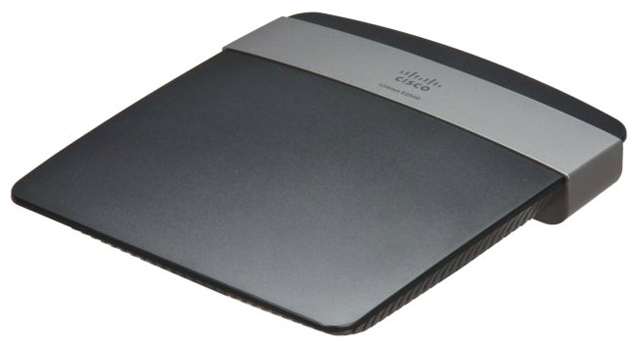
As soon as I upgraded my Linksys E2500 V1 firmware to the 2.0 version, I noticed the 5ghz network would not broadcast, It kept stating the Channel and Band as “N/A” on the Status page even though they were both set to “auto”. Rebooted the router and even reset to factory settings and still nothing. This is an older router so Cisco probably didn’t spend even 1 minute testing this new firmware before pushing it to thousands of users who bought their product :/ . And they had the nerve to REMOVE the previous firmware so you couldnt downgrade to the previous version… wtf! It took some time but finally found a stock 1.0.07 firmware binary on a ddwrt forum. Flashed it and the 5ghz network came back right away.
Symptom:
- 5Ghz network not broadcasted
Solution:
- Downgrade to the previous firmware 1.0.07
Note: Attached firmware below is for e2500 V1 and V2. Flash at your own risk I am not responsible for bricked routers.
NOTE: Rename the file to match the text below, ending in “.bin” before flashing!
thank you this really helped me fix my router after upgrading it. I couldn’t get the file you linked to work but was able to use the info to find it and fix the issue. I thought i was screwed.
You’re welcome! And thanks for the feedback, I’ve updated the post to make it clearer to use the .bin file. Have a nice day!
Thank you very much for this!
how do you get the file to go to downloads?????
Click on the link to the file and it should download or right click and “save as”
got that solved thanks, but it says upgrade failed.
Be sure to rename the file so it ends in “.bin” it should look like this without the quotes: “FW_E2500_1.0.07.001_US_20121129.bin” And also be sure your router is E2500 V1 or V2. V3 has a different firmware.
I solved that below, but I put dd-wrt on there went thru upgrade and it just puts the dd-wrt firmware on there.. I tried and tried does same thing everytime… if youncan help thanks if not that’s fine! and thanks for this.
If you have installed ddwrt look at the bottom of this page and try that in order to revert back to the stock firmware on this page. http://www.dd-wrt.com/wiki/index.php/Linksys_E2500#Reverting_to_stock_firmware good luck!
I think its v1 but I cant tell, how do you tell?
mines a v2
So the firmware above should work with your router “The hardware version is located beside or beneath the model number and is labeled version, ver. or V. If there is no version number beside the model number on your Linksys product, the device is version 1. If you still have trouble finding your version number, see the complete article to learn more.” from this page http://www.linksys.com/us/support-article?articleNum=148377
Oh thanks a lot. My Apple TV (3rd gen) did not connect anymore with version 2.0. Once I downgraded to version 1.0.07, it started to work again.
Great! glad you were able to downgrade!
Thanks a lot! This got my 5Ghz to show up again!
This seems to be a huge issue. Thanks for posting this. My issue is a double whammy, the Macbook Air’s have a 2.4ghz issue and I have a tonne of Bluetooth devices, so I need that 5ghz, and I really don’t want to spend 300$ on a Nighthawk.
Update: This totally worked – hopefully it stays like this.
Hey vonbraun! I’m glad you got your setup working! I’ve had no problems with the 5ghz band after reverting to the 1.0.0.7 firmware so hopefully you wont either 🙂
Thanks for the 1.0.0.7 firmware. I thought I was screwed after the upgrade to 2!
You’re welcome!
Thank you! Linksys support is useless, they refuse to provide previous versions of firmware and they want to charge you the cost of a new device to receive tech support. They actually recommended that I buy a new Linksys router. lol It’s like they released the firmware to intentionally break people’s routers to force them to upgrade.
I never have this problem with my Edimax router/repeater, they’ve been releasing steady reliable firmware updates for years for my.
Again, thanks for posting this firmware.
Glad the firmware worked for you! Too bad Linksys support does suck, won’t be buying their routers again. Also, nice profile pic!
Thanks a lot. That saved me from spending money on a new router. I had upgraded to v2 firmware quite a while back but for some reason it decided to stop working today for 5ghz.
Thanks for posting the firmware.
You’re welcome! glad it worked!
how to change .txt to .bin?
but the 2.00 firmware has fixed security vulnerabilities right? is it going to be okay in 1.7??
Windows: right click > Rename. OS X click on file and press enter. Yes, 2.0 is supposed to have security vulnerabilities but will break the 5ghz band, i guess it kinda depends on what which you prefer
Hello my friend, resolve my problem here, very thx
You’re welcome!
thanks for making the version available
I just wanted to shout out a great big thanks for this firmware file! We were having other connectivity issues and I thought maybe it was because I never did a firmware update. Then I ran the 2.0 (because the 3.0 wouldn’t even load) and our 5GHz band totally disappeared. I was just researching to purchase a new wireless router, when I happened to do a search on this subject and came across your posting. After downgrading back to 1.0, we’re back in business again. I still think I need to buy a new wireless router, but this gives me time to research without a hasty decision. Thank you Emmanuel Contreras!
Thanks for the comment! Glad to hear this resolved your problem! The 2.0 firmware is supposed to have some security fixes, so a new router would be a good idea. Have a nice day!
i have download firmware here : (http://www.asfafirmware.com/2016/07/linksys-e2500-firmware-download.html) linksys e2500 firmware
anyone have a tutorial how to setup this ?
In a browser window, type 192.168.1.1 username: blank password: admin go to Administration>Firmware Update . Rename the file attached to this post to end in “.bin” select the file and update your router. good luck!
You’re welcome!
Worked perfectly, thank you! Downgraded to this firmware file, and now my 5GHz network is up and running. Stupid 2.0 f firmware messing it up.
awesome! glad to hear it worked!
I have upgraded my E2500 router to updated firmware and now its stops browsing and all how can i get the old firmware back
Follow this video but with the file I’ve attached to this document. https://www.youtube.com/watch?v=dzTFiiiT7s4
Thanks friend! My 5G is back in biz.
ty so much!
You’re welcome! 🙂
Glad to hear! thanks for the comment 🙂